Why Do I See "Incomplete" Payments in My Stripe Dashboard?
If you've noticed a number of payments marked as "Incomplete" in your Stripe dashboard, don't worry — this is completely normal and does not indicate any issue with your account, your customers, or OpenCourt.
What's happening?
When a customer visits a checkout page on your OpenCourt site — whether they're purchasing a membership, buying a booking pass, or paying for a court reservation — Stripe requires OpenCourt to create something called a Payment Intent before the payment form can even be displayed.
Think of a Payment Intent as a placeholder. It tells Stripe: "A customer is about to pay this amount." At this stage, no money has been charged.
If the customer completes the payment, the Payment Intent is confirmed and you'll see a "Succeeded" status in Stripe. But if the customer leaves the page without finishing — maybe they got distracted, changed their mind, or just closed the browser tab — the Payment Intent stays behind with an "Incomplete" status.
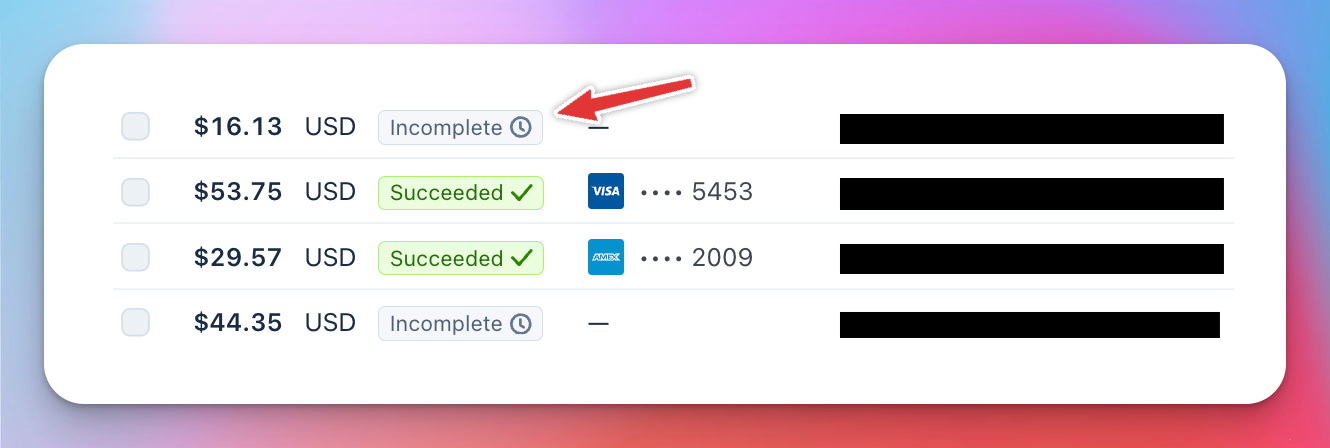
Every platform that uses Stripe's modern payment form works this way. It is not unique to OpenCourt.
Are my customers being charged?
No. Incomplete payments mean that no charge was made. No money left the customer's account. These are simply records of payment forms that were displayed but never submitted.
Will these clean up on their own?
Incomplete Payment Intents will remain on your Stripe dashboard unless you manually cancel them. However, they are harmless — they don't affect your balance, your payouts, or your customers in any way. They are simply records of payment forms that were opened but never completed.
For incomplete subscriptions specifically, Stripe itself automatically expires them after 23 hours if the first invoice is never paid. These will show as "Incomplete Expired" or "Cancelled" in your dashboard, which is also normal.
Can I filter them out?
Absolutely. In your Stripe dashboard, instead of viewing "All" payments, use the "Succeeded" filter to see only completed, successful transactions. This gives you a clean view of actual revenue without the noise of incomplete entries.
What if I see the same customer with multiple incomplete entries?
This can happen if a customer visits your checkout page more than once without completing the purchase. Each visit generates a new Payment Intent. You can manually cancel these in your Stripe dashboard if you'd like to keep things tidy.
Should I be concerned?
Not at all. Seeing incomplete payments is completely normal. Many of your customers are simply exploring — they might click through to see pricing, check availability, or browse membership options. Once they see the details, some will complete the purchase and others will move on. That's expected behavior, and every incomplete entry is just evidence of someone discovering what your facility has to offer.
If you have any questions, feel free to reach out to us at support@getopencourt.com.