Access codes & scheduling
When door codes activate and expire, and how Just-in-Time scheduling keeps high-volume clubs within their locks' code-storage limits.
This page explains when a booking's door code is active, and the two ways OpenCourt can schedule codes onto your locks. Most clubs never need to change anything here — but if you run a high volume of bookings, or use locks that store only a limited number of codes, it's worth understanding.
When is a door code active?
Every booking's code is time-limited, no matter which provider or scheduling mode you use. By default:
It becomes active 30 minutes before the reservation start time.
It expires 10 minutes after the reservation end time.
Outside that window the code does nothing — a customer can't get in early or stay late on it.
The window follows each lock's access rule, so you can change it per lock: the min before / min after values on the lock's During reservations only rule set both the unlock window and the code window. See Set who can unlock doors from the app. The exact window for every issued code is shown in the Access Codes table (Valid From / Valid Until).
Scheduling modes: when the code reaches the lock
"Scheduling" is about when the code is pushed onto the physical lock, which matters because most locks can only store a limited number of codes at once.
Until a code is pushed to the hardware, the Access Codes table may not show its final PIN yet — that's normal. The PIN appears once the lock accepts it.
Some keypad locks store only a few dozen codes at a time — Lockly models are the ones clubs hit this with most often. A busy club booking many spaces days in advance can exceed that on Native Scheduling, and the lock starts rejecting new codes.
How do I switch scheduling modes?
Go to Settings → Access Controls and find the Access Code Scheduling section. Two options:
Native Scheduling — "Codes are pushed to the lock 72 hours before activation. More reliable, but some devices have low code capacity limits which can cause issues with high reservation volume."
Just-in-Time Scheduling — "Codes are pushed to the lock 60 minutes before activation. Avoids device capacity limits, but requires the lock to have internet connectivity before each reservation."
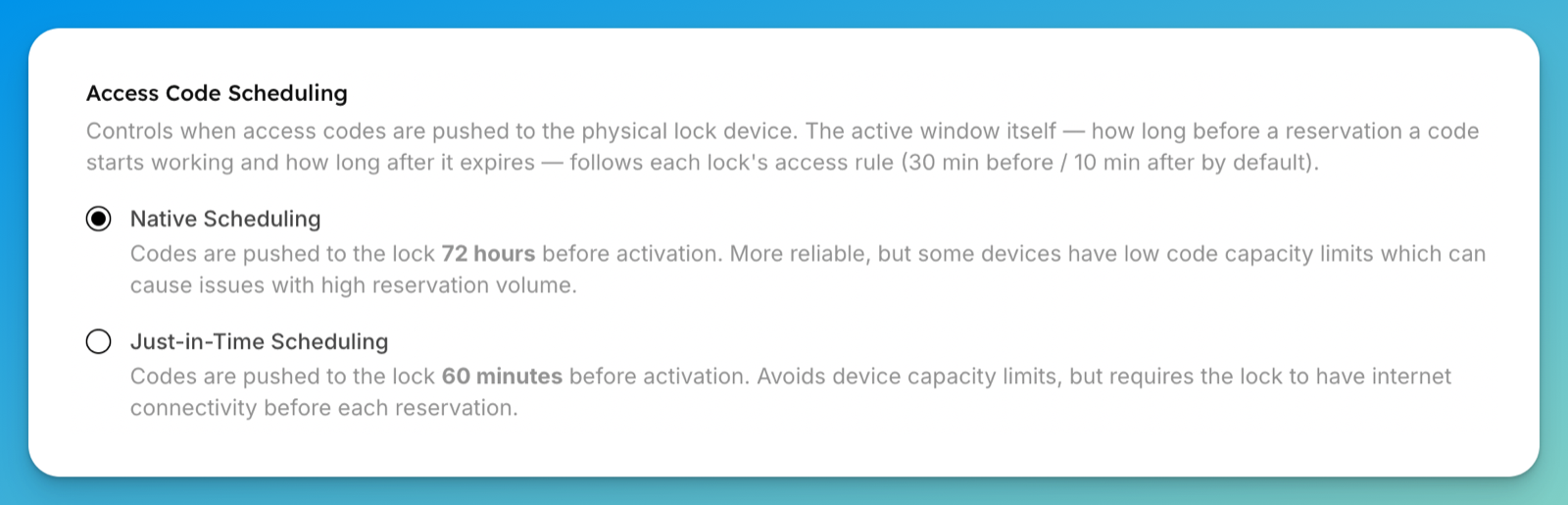
Scheduling controls when the code is pushed to the lock, not when it works. The active window — how long before a booking a code starts working and how long after it stops — comes from each lock's access rule (30 min before / 10 min after by default). See Set who can unlock doors from the app.
The Access Code Scheduling section appears for Seam-connected clubs. Other providers push codes their own way — for example, RemoteLock pushes the code and waits for the lock to confirm it, retrying if the lock is asleep. Until it confirms, the code shows as pending; on capacity-limited locks it may hold a code back until closer to the booking. That's normal, not a fault.
When to switch to Just-in-Time
Consider Just-in-Time Scheduling if any of these is true:
Customers report codes that don't work, or your team sees
access_code.failed_to_set_on_deviceerrors.Your club has a high volume of upcoming bookings relative to what your lock can store.
You use Lockly locks (or others with limited code capacity).
Your locks have reliable internet (Just-in-Time needs the lock online about an hour before each booking).
If something goes wrong
Codes intermittently fail on a busy lock — you're likely hitting the lock's code-storage limit on Native Scheduling. Switch to Just-in-Time in Access Code Scheduling.
A code didn't work right at the booking start — codes activate 30 minutes before the start by default, and on Just-in-Time the lock must have been online about an hour earlier to receive it. Check the lock's connectivity, then work through A customer can't get in.
A far-future booking shows no PIN yet — expected. The PIN appears once the code is pushed to the lock (about 72 hours ahead on Native, about an hour ahead on Just-in-Time).